
Explore the project before it exists.
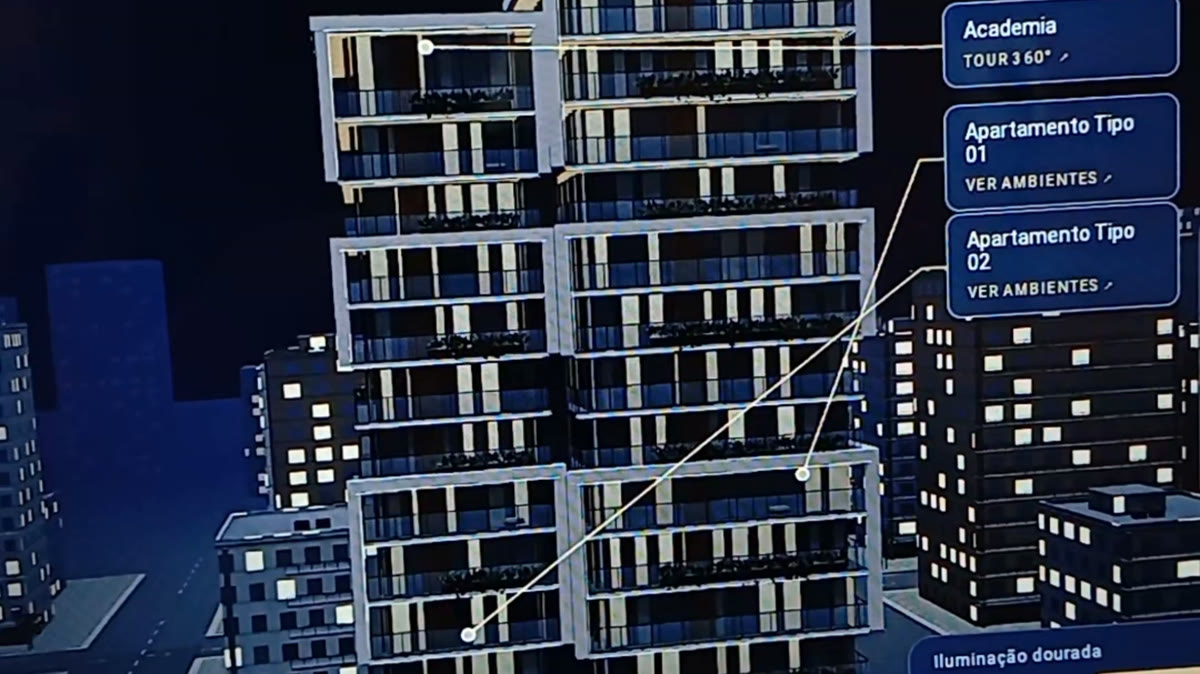
An immersive website is a navigable digital experience: visitors open the development in the browser and move through it, instead of only watching finished images. The video above shows a Flow Prime demonstration in use: the building in 3D in its urban context, explored with taps on the screen.
What it is, in practice
It is the architectural project turned into an interactive 3D environment, accessed directly in the browser, with no app to install. The same material can run on a touch screen at the sales stand, on a tablet in the broker’s hands, on a kiosk, or be sent by link for clients to explore from wherever they are.
How navigation works
The experience combines different ways to explore the project, which can be chosen according to the development:
Overview
The whole building appears in the context of the neighborhood. Visitors rotate, zoom in and out to understand the site plan, volumes and surroundings, with a finger on the screen or with the mouse.
Points of interest
Markers on the model itself lead to specific destinations: common areas, such as the pool or gym, and the apartment types. In the demonstration, the common areas open 360° tours and the units lead to the interior spaces.
Units and rooms
It is possible to isolate a unit to see its details and step inside to explore the interiors, room by room.
First-person walkthrough
In some projects, visitors walk through the development at eye level. On a computer, navigation uses the keyboard and mouse; on phones and tablets, touch controls right on the screen.
Lighting
The same scene can be seen in different light conditions, such as daytime, nighttime or golden late-afternoon light. This helps buyers picture the development at different moments of their routine.
Floor plan and levels
In projects with more than one floor, the experience lets visitors switch levels and check the floor plan without leaving the navigation. Floor plan, images and walkthrough come from the same geometric base, so what you see in one format matches the other.
Where it helps presentation and sales
- Sales stand: on touch screens or kiosks, clients explore the project with the broker beside them.
- Meetings and presentations: on tablets, brokers guide the conversation through the rooms that matter most to each client.
- Remote service: sent by link, the immersive website lets clients explore the project before visiting the stand.
- Development website: as an extra layer for those who want to understand how the rooms are laid out.
The immersive website does not replace the film or the renders: it sits alongside them. The film creates desire and tells the development’s story; the immersive website answers the questions of those who want to understand the space more calmly.
How the project is built
The starting point is the same as for any Flow Prime visualization: floor plans, sections, elevations and project information. From there, the development is modeled in 3D and prepared to run smoothly in the browser, which means balancing visual quality and performance on computers, tablets and phones.
- Modeling: the building and units are built from the approved project.
- Context: the surroundings are represented to place the development in its neighborhood.
- Content: points of interest, tours, floor plans and images are organized according to the sales script.
- Publishing: the experience is prepared to be accessed by link, on a touch screen or on a tablet.
Film and immersive website: when to use each
The film is the best tool to move people and present the development in a few minutes, with controlled pace, music and narrative. The immersive website is the best tool for those who are already interested and want to investigate: compare units, go back to a room, see the view from a specific floor. In a complete launch, the two work together: the film attracts and the immersive website deepens.
Frequently asked questions
Is an app required?
No. The experience runs in the browser, on computers, tablets and phones.
Does it work on phones?
Yes, with touch controls. On small screens, the experience is adapted to keep navigation simple.
Can it live on the development’s website?
Yes. It can be accessed by link, embedded in the development’s website or used on touch screens and tablets at the sales stand.
Does the project need to be finished?
No. The immersive website is made precisely to present what does not exist yet. What it needs is an architectural project defined enough to be modeled faithfully.
Site and context
When the project calls for it, the site context can be brought into the model from a preliminary reading of the terrain: elevation profile, slope and contours derived from digital terrain models, compared with satellite imagery. This helps guide how the building sits in the model.
This reading supports modeling and serves as a basis for investigation. It does not replace a topographic survey or define construction levels.
Limitations, plainly
- Levels and heights that are not yet confirmed are labeled as hypothetical.
- Ambience images are a reference for atmosphere and materials, not photographs or construction drawings.
- The experience presents the project; it is not a technical construction document.
- The level of detail in each room depends on the scope defined for the development.
Who it is for
For developers, builders and architects who need clients to understand the space before construction, and for sales teams that want a presentation tool beyond the film and renders. Talk to Flow Prime to see how the experience applies to your development, or see all services.